The short version
- A concept, a clickable prototype, a proof of concept and an MVP answer different questions: what and for whom, can people use it, can it be built, and will they pay.
- Validate the problem before you design: ask about people's past behaviour rather than your idea, and run a smoke test that measures what they do.
- Scope each prototype around the riskiest open assumption, with the test date and the participants booked before you start.
- Test clickable prototypes with five users per round and fix between rounds; test the hard technical or AI part separately, with a timeboxed spike on real data.
- Decide before you build whether the prototype will be thrown away or evolved, and present it honestly to investors and pilot customers.
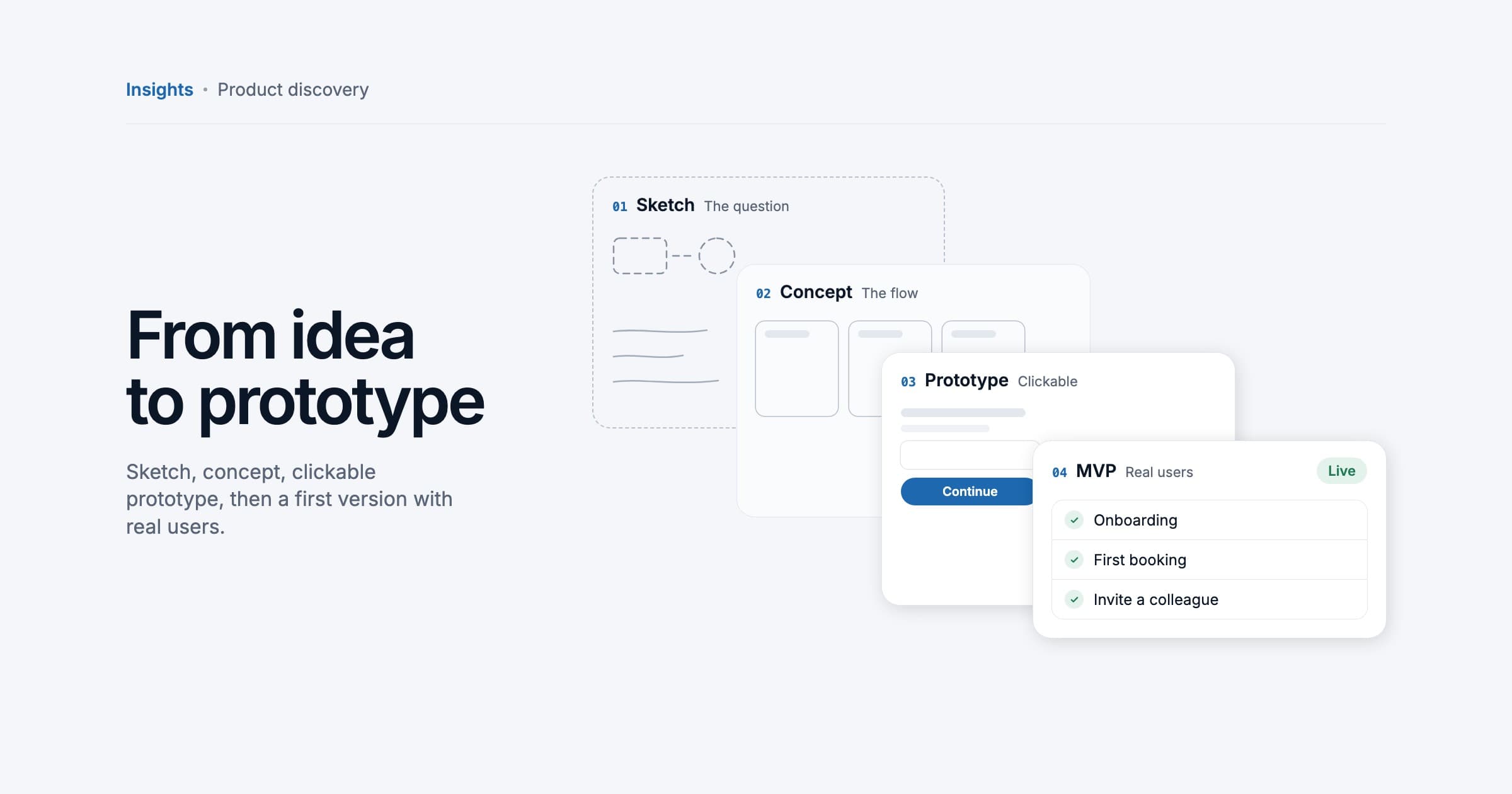
To go from idea to prototype, first check that the problem is real, then build the cheapest thing that answers your riskiest open question. A concept answers "what are we building, and for whom?", a clickable prototype answers "can people use it?", a proof of concept answers "can it be built?", and an MVP answers "will people use it and pay for it?". With customer interviews in week one, a clickable prototype tested with five users and, where needed, a technical spike, a narrow idea can be tested in two to four weeks rather than months.
Concept, prototype, proof of concept, MVP: what each one answers
These words are used interchangeably in pitch decks and offers, which is how founders end up paying for the wrong thing. Each answers one question, for a different audience, with a different lifespan.
| Artefact | Question it answers | Typical form | Lifespan |
|---|---|---|---|
| Concept | What are we building, for whom, and why would they care? | A one-page problem statement, user flows, rough sketches | Kept as the reference and revised often |
| Clickable prototype | Can people understand and use it? | Linked screens in a design tool such as Figma, no real data | Thrown away once the design is settled |
| Proof of concept | Can the hard part be built, at acceptable cost and speed? | A narrow technical spike: a script, an integration test, an AI evaluation | Usually thrown away; the findings are kept |
| MVP | Will people use it and pay for it? | Working software with real accounts, real data and often payments | Kept and built on |
Eric Ries defined the minimum viable product as the version of a new product that lets a team collect the maximum amount of validated learning about customers with the least effort. The prototype and the proof of concept come before it and are cheaper still. For what comes after, our guide to building an MVP that still works in month nine covers the foundations.
Validate the problem before you design anything
The most expensive prototype is a beautiful one for a problem nobody has badly enough to change what they do.
Customer interviews that don't mislead you
Rob Fitzpatrick's The Mom Test is the standard guide here, built on one observation: people are polite about your idea. Its three rules are to talk about their life instead of your idea, to ask about specifics in the past instead of generics or opinions about the future, and to talk less and listen more.
- "When did this last happen? Walk me through it."
- "What did you do about it, and what did that cost you in time or money?"
- "What have you already tried, and why did you stop?"
- "Who else is involved when this goes wrong?"
Avoid "Would you use…?" and "How much would you pay for…?". Hypothetical answers are opinions about the future. The honest signal is in what people already do: workarounds, spreadsheets, money already spent, and whether they agree to a concrete next step such as a second meeting, an introduction to a colleague or a pilot.
Smoke tests: measure intent, not compliments
A smoke test shows people the promise before the product exists and measures what they do. Common forms are a landing page with one clear call to action (join the waitlist, book a demo, pre-order), a "fake door" button in an existing product, and a concierge test, where you deliver the outcome by hand to a few customers. Decide in advance which result counts as a yes, so you cannot talk yourself into one afterwards. Be honest with visitors about what exists, and add a privacy notice if you collect email addresses.
Before you move on from validation
- You can describe the problem in your customers' own words, from several separate conversations.
- You know what they do about it today and what that costs them.
- You have one sharply defined first user: role, type of company and situation.
- Some people have agreed to a concrete next step, not just said it sounds great.
- You have written down the riskiest assumption that is still open.
Scope the prototype in days, not months
A prototype is scoped by its question, not by a feature list. Take the riskiest open assumption and build only what tests it. Everything else is decoration.
- Write the riskiest assumption as a sentence that could turn out to be false, for example "Practice managers will let patients rebook appointments without a phone call."
- Classify it. Desirability and usability need interviews and a clickable prototype; feasibility needs a technical spike; viability needs pricing conversations and, later, a pilot.
- Pick one user and one path, from the trigger to the outcome. A single path of a handful of screens is usually enough.
- Fix a timebox and a test date before you start, and book the test participants now, so the date cannot slip.
- Agree what you will decide afterwards: proceed, change direction, or stop.
GV's design sprint shows how far a timebox can go: five days from mapping the problem to watching customers react to a realistic prototype, on the principle that "a realistic façade is all you need to test with customers". You don't need a formal sprint, but a fixed test day keeps a prototype small.
UX and UI: from user flow to tested prototype
User flows
Start with the flow, not the screens: the steps from the trigger ("a patient's appointment is cancelled") to the outcome ("a new slot is booked"), with the decision points and what happens when something goes wrong. A flow on one page exposes missing and unnecessary steps before anyone draws a pixel.
Wireframes
Wireframes are low-fidelity screens: layout, content and actions in grey boxes. They are quick to change, even between test sessions, and Nielsen Norman Group points out that low-fidelity prototypes make it obvious the design is unfinished, so people are more willing to criticise it.
Clickable prototypes in Figma
For testing with users and showing to investors, link realistic screens into a clickable prototype. In Figma you connect frames with interactions into flows, then share a link or present the prototype on a device. Every click target on the tested path has to work, or the session breaks down. Use realistic content in your customers' own vocabulary; placeholder text hides the questions that matter.
Usability testing with five users
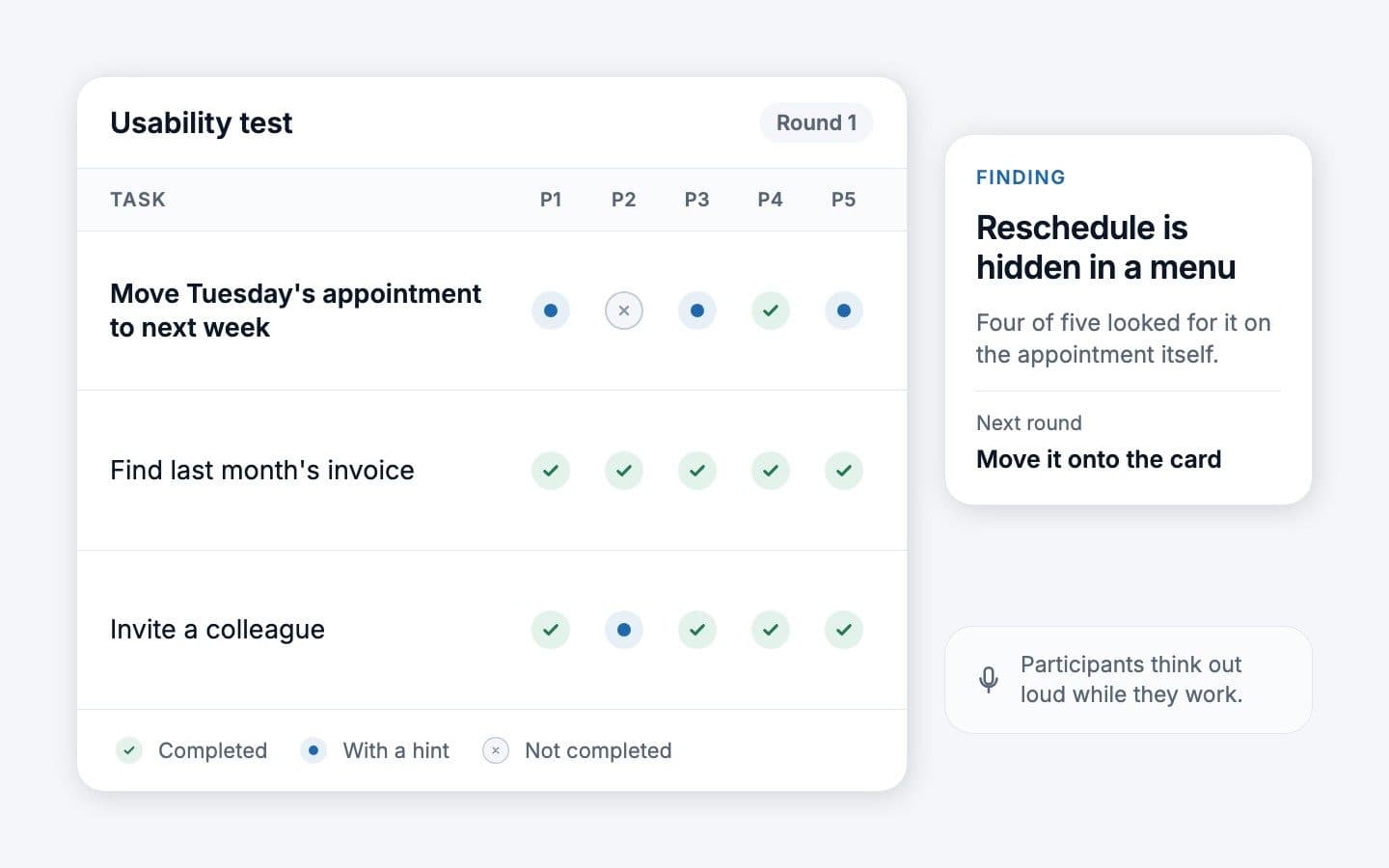
Jakob Nielsen of Nielsen Norman Group argues that a qualitative test with five users finds about 85% of the usability problems, and that a budget is better spent on three rounds of five, fixing the design in between, than on one large study. Two caveats: with distinctly different user groups, such as clinic staff and patients, test three or four people from each; and quantitative metrics need more than five.
A usability test needs a facilitator, realistic tasks and participants who match your first user, who think out loud while they work. Write tasks as goals, not instructions: "You need to move Tuesday's appointment to next week", not "Click Reschedule". NN/g warns that step descriptions contain hidden clues about how to use the interface.
Technical spikes and AI feasibility checks
A proof of concept answers the feasibility question, and its quickest form is a spike. Ward Cunningham recalls asking Kent Beck "What is the simplest thing we can program that will convince us we are on the right track?", and Beck called the answer a spike: end to end, but very thin. A spike is timeboxed, narrow and usually thrown away. The finding is the deliverable, not the code.
- Integrations with systems you don't control, such as an ERP, a practice management system or a banking API: can you authenticate, read and write what you need, within its rate limits and terms of use?
- Speed and scale: can the search, matching or calculation answer in the time a user will actually wait?
- Data you assume exists: is it available, clean enough and lawful to use for this purpose?
- Device features: offline sync, Bluetooth or the camera, on real phones.
AI feasibility: test the model on your real cases
For AI products the demo is the easy part: a prompt that works on three hand-picked examples tells you little about the real ones. A useful check:
- Collect real inputs, including the messy ones: incomplete forms, the wrong language, ambiguous requests.
- Write down what a correct output looks like, and what error rate is acceptable, before you run anything.
- Grade automatically where you can. Anthropic's guidance on building evaluations recommends mirroring your real task distribution, edge cases included, and prefers many automatically graded test cases to a few graded by hand.
- Measure cost and response time per request at the volume you expect, not just accuracy.
- Check where the data goes: which provider, which region, under which contract. Our guide to GDPR compliant AI hosting covers the options.
Before any model is wired up, a "Wizard of Oz" prototype, where a person produces the answers behind the interface, tests the experience itself; Nielsen Norman Group names it for AI features before the AI is built. It separates two questions: do users want this answer, and can a model produce it reliably?
What to show investors and pilot customers
Each audience asks a different question, so show each different evidence.
| Audience | What they want to know | What to show |
|---|---|---|
| Investors | Is the problem real and big enough, why you, why now, and what the money buys | Interview evidence, smoke test results as they are, a short prototype walkthrough, the spike findings and the plan for the first version |
| Pilot customers | Will this solve my problem without putting my business at risk | The prototype on their own scenario, the pilot's scope, how their data is handled, and what happens afterwards |
| Technical advisers or due diligence | Can this team build it, and is the hard part solved | The spike code and write-up, the proposed architecture and the decisions still open |
Be explicit about what is real. A clickable prototype presented as working software is the quickest way to lose an experienced investor or a pilot customer's IT department.
Write each pilot down on one page: goal, success criteria, duration, who does what, and what happens if it works. A pilot without success criteria tends to end in a polite "interesting" rather than a contract.
Throw the prototype away or evolve it?
Decide this before you build, because it changes how the prototype is made. The rule of thumb: design prototypes and spikes are thrown away, and an MVP is kept. The danger is the middle, a coded prototype that quietly becomes the product.
Martin Fowler calls deliberately disposable code sacrificial architecture and points out that eBay started as a set of Perl scripts built over a weekend in 1995. Throwing code away is fine when it was the plan; the problem is code that was never built to be kept, kept anyway.
| Throw it away when | Evolve it when |
|---|---|
| It was built in a prototyping tool, or with shortcuts in data, login or security | It was built on product foundations: a real data model, proper authentication, tests and an automated deploy |
| It answered its question, and the answer changed the plan | The concept held up and the code matches the architecture you would choose anyway |
| Nobody depends on it yet | Real users depend on it and its foundations can be made sound without a rewrite |
If you evolve it, review the code and fix the expensive foundations first: data model, accounts and roles, payments and hosting region, as the month-nine guide explains.
A two to four week plan from idea to tested prototype
The plan assumes one idea, one first user and a small senior team. Two weeks often suffice for desirability and usability; plan four when an integration or an AI model also has to be proven.
| Week | Focus | What you should be holding |
|---|---|---|
| Week 1 | Problem interviews, a smoke test if it fits, the riskiest assumption in writing, the user flow for one path | Interview notes, a one-page concept, a flow, participants booked |
| Week 2 | Wireframes, then a clickable prototype; a first usability round with five users; fix and retest | A tested clickable prototype and a list of what changed and why |
| Week 3 (if needed) | Technical spikes or the AI feasibility check, alongside a second design round | Spike findings, an evaluation result, cost and response times |
| Week 4 (if needed) | Decide: an architecture sketch for the first version, the scope cut, pilot terms, investor material | A go, change or stop decision and a scoped first release |
The output of this plan is a decision backed by evidence, not software. If the answer is go, the next step is the first version, built on foundations you keep.
Costs, and the pitfalls that raise them
A prototype costs mainly people's time, so cost follows scope: the number of user groups and flows, wireframes or brand-level visuals, and whether a technical or AI feasibility check is needed. For an indicative range for your own idea, use our free estimate; it is an estimate, not a quote.
- Prototyping before validating. A polished prototype for an unconfirmed problem is a very expensive survey.
- Collecting opinions instead of watching behaviour. "I would definitely use this" is not evidence; a booked pilot is.
- Too much fidelity too early. Brand-level visuals before the flow is settled make every change slower and every critic more polite.
- A demo that hides the hard part. If the AI or the integration is faked, say so, and test it separately.
- A prototype that becomes the product by accident. Decide up front whether it will be thrown away or evolved.
- Assets in someone else's name. Design files, test recordings, domains and repositories should belong to your company from day one.
How we can help
Bespoke IT works with founders from the concept to the first version: product work to find and test the riskiest assumption, UX and UI design from user flows to clickable prototypes tried with real users, architecture and technical spikes for the hard part, and the engineering of the version you keep. Our startup engagements begin with a discovery sprint, and our app design and development page shows concepts from our design team beside products we shipped.
Through our partner Salford Ventures GmbH in Düsseldorf, founders also get help with financing: shaping the strategy, the financial plan, preparing the documents investors ask for, and a list of investors to approach. See how we work with startups, get an indicative range for your prototype, or contact us to talk it through.
Have a question about your own setup?
Ask our AI coworker. It answers in seconds and a person from our team follows up.

Bespoke One Coworker. AI assistant. Answers in seconds, estimate in three minutes.