The short version
- AI saves the most where work sits between systems: reading documents and emails, keying data, sorting requests, looking things up and drafting.
- Put AI inside the ERP, CRM, help desk and Microsoft 365 you already run, so it prepares records in the system of record and people approve them.
- Use rules for rules, AI for unstructured input with a checkable result, and people for judgement; controlled studies show AI hurts accuracy on tasks it is poor at.
- The business case is hours today × share AI takes over × fully loaded cost, plus avoided errors, minus running costs and review time; the share is the number to test.
- Start with one process in shadow mode, keep a human in the loop, host in the EU, tell people when they talk to AI, and measure the same way before and after.
AI saves time and money in the systems a company already runs (an ERP such as SAP, DATEV, a CRM such as Salesforce or HubSpot, Microsoft 365, the help desk) by taking over the work that sits between them: reading invoices and emails, typing what they say into the right fields, sorting requests, looking things up and drafting replies and reports. The gains are real but uneven: in controlled studies, support agents with an AI assistant resolved 15% more issues per hour and consultants finished suitable tasks 25% faster, yet made more mistakes where the AI was weak. The business case is plain arithmetic: hours spent today × the share AI takes over × the fully loaded cost of an hour, plus avoided errors, minus running costs and review time.
Where the time goes today
The hours rarely disappear into one big task. They leak through hundreds of small hand-offs between systems that do not talk to each other.
- Manual data entry. In a July 2025 survey of 500 US professionals, run by Parseur with QuestionPro, respondents said they spend more than 9 hours a week moving data from emails, PDFs and spreadsheets into systems, at an estimated $28,500 per employee a year. Parseur sells document processing software, so read it as a vendor survey.
- Document handling. Invoices, delivery notes, contracts and certificates are opened, read, renamed, filed and keyed. In APQC's benchmark of 1,485 organisations, the median cost to process one invoice was $5.83, the top quarter spent $2.07 or less and the bottom quarter $10 or more. Much of the gap is how many invoices someone touches.
- Email triage. Shared inboxes where a person reads every message only to decide who should read it next.
- Reporting. The median monthly close in APQC's benchmark of 2,300 organisations took 6.4 calendar days; the top quarter needed 4.8 or fewer.
- Lookups. Which contract version did the customer sign, what did we agree last spring: answered by searching SharePoint, the ERP and old email threads. In the UK government's Copilot trial, over 70% of users agreed the assistant cut the time they spent searching for information.
Why AI belongs inside the systems you already use
Adoption is climbing but far from universal. According to Germany's Federal Statistical Office, 26% of companies with at least ten employees used AI in 2025: 23% of small firms, 36% of medium-sized ones and 57% of large ones. Among companies that had considered AI but not used it, the reasons given were lack of knowledge (72%), unclear legal consequences (62%), data protection concerns (60%) and incompatibility with existing devices, software and systems (45%).
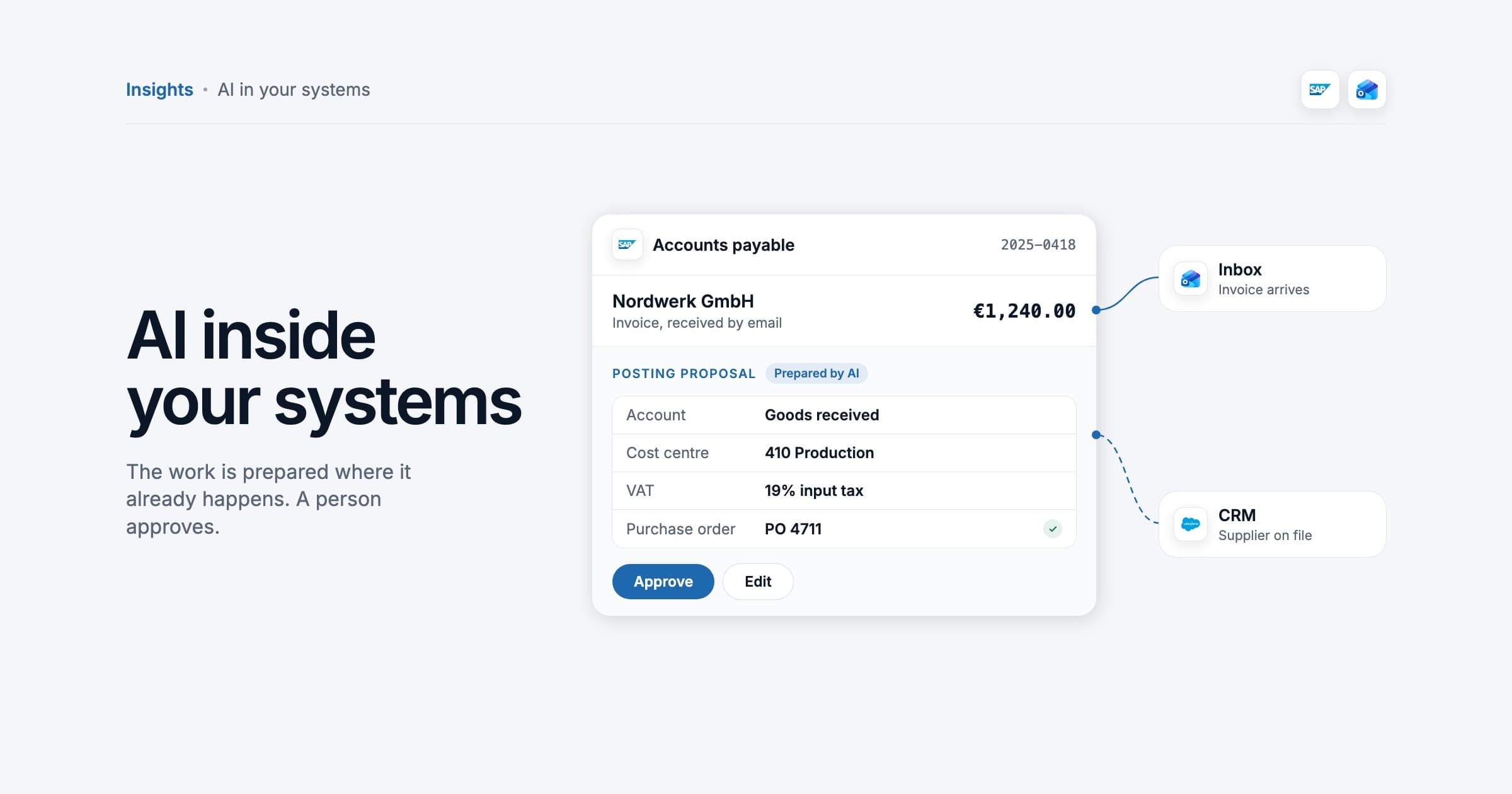
That last point is the practical one. A standalone AI tool adds one more window to copy and paste between. The value appears when the agent reads from and writes to the system of record: the invoice arrives in the ERP as a posting proposal, the call summary lands in the CRM as an activity, the classified email becomes a ticket with the right customer attached. The system of record stays the single source of truth: AI prepares, a person approves, the system books. Start read only, give the agent a service account with the least rights that work, and let it write only through narrow, logged actions such as "create posting proposal".
Built-in assistant or custom agent
SAP, Salesforce, HubSpot and Microsoft all ship assistants inside their products. They are the quickest start when the work stays inside one product. A custom agent, connected through each system's API, earns its cost when a process crosses systems (email to ERP to DATEV) or when you need control over hosting, model choice and logs.
| Built-in assistant | Custom agent | |
|---|---|---|
| Best for | Work inside one product: summarising in Microsoft 365, drafting in the CRM | Processes that cross systems, or need your own rules and approvals |
| Data access | What that product already holds | Exactly the fields and actions you grant, per system |
| Cost model | Licence per user or per conversation | Build once, then model usage, hosting and maintenance |
| Main limit | Stops at the product's edge | You own testing, monitoring and change |
What AI does well, and what it does not
The best evidence comes from two field experiments. In a study of 758 BCG consultants, those using GPT-4 on tasks inside the AI's capabilities completed 12.2% more tasks, 25.1% faster, at more than 40% higher quality. On a task just outside them, consultants with AI were 19 percentage points less likely to reach the correct answer than those without. In the Quarterly Journal of Economics study of 5,172 customer support agents, an AI assistant raised issues resolved per hour by 15% on average and by about 30% for less experienced agents, while the most skilled saw little gain in speed and a small drop in quality.
The practical rule follows. Work comes in three kinds. Fixed rules ("invoices over €5,000 go to the CFO") belong to classic automation: cheaper, faster and fully predictable, no model needed. Unstructured input with a result someone can check (an invoice PDF, a free text email, a call transcript) is where AI earns its place. Judgement, accountability and exceptions stay with people, with AI preparing the file.
| Good fit | Poor fit |
|---|---|
| Extracting fields from invoices, orders and delivery notes | Deciding whether to pay a disputed invoice |
| Classifying and routing emails and tickets | Handling a complaint from an upset key account |
| Drafting replies, summaries and report commentary from your data | Final figures without a source the reader can check |
| Answering questions from your own documents, with the source linked | Questions your documents do not answer |
| Matching records across systems and flagging differences | Anything a fixed rule already handles reliably |
Use cases by department
Finance and accounts payable
An agent reads each incoming invoice, whether PDF, scan or structured e-invoice, proposes supplier, GL account, cost centre and tax code, matches it against the purchase order and goods receipt, checks for duplicates and chases the approver. Germany's e-invoicing rules help: since 1 January 2025 every domestic business must be able to receive e-invoices, so more invoices arrive as data (deadlines in our e-invoicing guide). Keep payment release, new suppliers and any change of bank details with people: the last is a classic fraud route.
Customer service
Klarna's assistant handled two thirds of its customer service chats in its first month, 2.3 million conversations, which the company described as the work of 700 full-time agents, with an estimated $40 million profit improvement for 2024. Fifteen months later its chief executive told Bloomberg that Klarna would recruit people again so customers could always reach a human, conceding that cost had weighed too heavily. Both halves are the lesson: automate routine requests, keep a fast route to a person. Our guide to AI agents in customer service covers hand-off rules and metrics.
Sales operations
An agent turns a call transcript or meeting notes into a CRM activity with next steps, updates deal fields, enriches new leads from their website and drafts the follow-up email and the quote from the ERP price list. The salesperson reviews and sends. Cleaner CRM data is often the bigger win, because forecasts depend on it.
HR
Good first uses are answering policy questions from the handbook with the paragraph linked, collecting onboarding documents and preparing contracts from approved templates. Ranking CVs or evaluating staff is a different category: such systems are high risk under Annex III of the AI Act, with heavy duties for the companies using them, as our AI Act guide explains.
IT
For password resets, access requests and how-to questions, an agent classifies the ticket, answers from the knowledge base, collects the details an access request needs and routes it to the approver. Privileged access and changes to production systems stay with an engineer.
How to calculate the business case
- Hours today: people doing the work × hours each spends on it a week × 46 working weeks.
- Hours AI takes over: hours today × the share AI handles. Start cautious and replace the guess with the share you measure in a pilot.
- Value of that time: hours taken over × fully loaded hourly cost (salary, employer contributions, workplace and overhead).
- Errors and delays avoided: rework, duplicate payments, missed early payment discounts, late fees, SLA penalties.
- Running costs: licences, model usage, hosting, maintenance and the human time spent reviewing the AI's work.
- Payback: one-off cost ÷ monthly net benefit. Full-time equivalents: hours taken over ÷ 1,720 hours a year.
A worked example (hypothetical)
Assumptions, all hypothetical: a company of 250 people receives 18,000 supplier invoices a year. Three accounts payable clerks each spend 25 hours a week keying, coding, matching and chasing approvals. An hour costs €45 fully loaded. Two percent of invoices need correction later, at 45 minutes each. Licences, model usage and hosting cost €30,000 a year. Reviewing the agent's proposals takes 10% of the hours it takes over.
| Line | Base case (AI takes over 60%) | Cautious case (30%) |
|---|---|---|
| Hours today (3 × 25 h × 46 weeks) | 3,450 h | 3,450 h |
| Hours AI takes over | 2,070 h | 1,035 h |
| Value at €45 an hour | €93,150 | €46,575 |
| Rework avoided (half / a quarter of 270 h) | €6,075 | €3,040 |
| Running costs | −€30,000 | −€30,000 |
| Review time (10% of hours taken over) | −€9,315 | −€4,660 |
| Net benefit a year | €59,910 | €14,955 |
| Full-time equivalents (÷ 1,720 h) | 1.2 | 0.6 |
In the base case each €10,000 of one-off cost pays back in about two months; in the cautious case it takes about eight. The share AI takes over moves the result more than any other input, which is why it should be measured in a pilot before anyone signs a large budget. The savings calculator on our process automation page uses the same logic, 46 working weeks and 1,720 hours per full-time role, with your own numbers.
What the published evidence says
| Source | Setting | Finding | Read it as |
|---|---|---|---|
| UK Government Digital Service, June 2025 | 20,000 civil servants, Microsoft 365 Copilot | 26 minutes a day saved on average | Self-reported; 17% saw no clear saving |
| Brynjolfsson, Li and Raymond, 2025 | 5,172 support agents | 15% more issues resolved per hour; about 30% for newer agents | Strong evidence, for an assistant |
| Dell'Acqua et al., 2023 | 758 BCG consultants | 25.1% faster on suitable tasks; 19 points less often correct on others | Task choice decides |
| Gartner, March 2025 | Prediction for customer service | 80% of common issues resolved by AI by 2029; 30% lower operating costs | A forecast |
Two patterns run through all of it, and through Klarna's experience above. The gains are largest on high volume, well documented work, especially for people who are not yet experts in it. And the gains hold when a person stays in the loop for what the AI handles badly.
How to start safely
- Pick one process with high volume, written rules, a checkable result and cheap mistakes. Invoice capture and ticket triage usually qualify.
- Measure the baseline for two to four weeks: volume, touch time per item, cycle time, error rate.
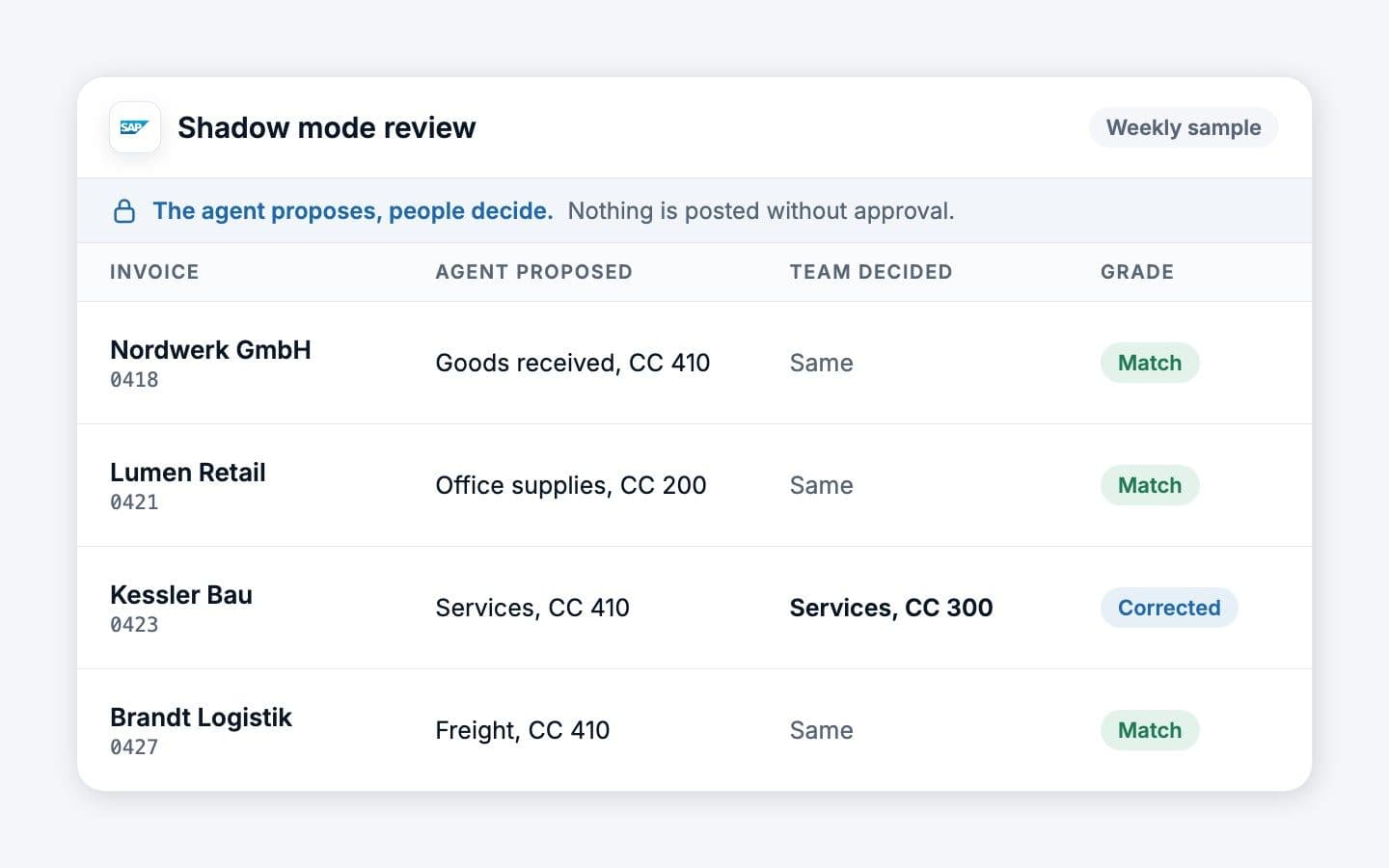
- Run in shadow mode. The agent proposes, people decide, nothing is written without approval. Grade a sample every week.
- Design the human in the loop: approval thresholds, a confidence level below which items go to a person, a weekly sample review.
- Widen the scope only when the numbers hold, one document type or request type at a time.
GDPR and EU hosting
Invoices, emails and CRM records contain personal data, so the GDPR applies in full: a data processing agreement under Article 28 with every AI vendor, processing in an EU region, a check whether your data trains the vendor's models, a retention period for prompts and logs, and care with Article 22, which restricts decisions with significant effects on people made by software alone. Hosting options are compared in our guide to GDPR-compliant AI hosting in Germany.
The EU AI Act in brief
For most back-office agents, two duties apply today. Since 2 February 2025, Article 4 requires that staff who use AI systems have sufficient AI literacy. Since 2 August 2026, Article 50 requires that people are told when they are interacting with an AI system, so a customer-facing agent must say so at the latest at the first interaction. HR uses such as CV ranking are high risk. Details, roles and dates are in our guide to the EU AI Act for AI agents.
Before the first process goes live
- One process, its scope and its never list written down
- Baseline measured: volume, touch time, cycle time, error rate
- Agent writes only through narrow, logged actions with least privilege
- Approval thresholds and confidence fallback configured and tested
- DPA signed, EU processing confirmed, retention set, training use excluded
- AI disclosure in place wherever the agent talks to people
- Staff using it trained; works council informed or agreement signed
- An owner for the weekly sample review and the monthly numbers
Measuring results
Measure the same things, the same way, before and after. Vendor dashboards count what is easy; you want what changed in the work.
| Metric | How to measure it | What it tells you |
|---|---|---|
| Touch time per item | Minutes of human work per invoice, ticket or record, sampled | The real time saved |
| Straight-through rate | Share of items approved without any correction | How much the agent really takes over |
| First-pass accuracy | Weekly sample graded against the source document | Whether quality holds as volume grows |
| Cycle time | Receipt to booking, or request to resolution | Speed the business can feel |
| Exception rate and reasons | Items routed to people, grouped by cause | Where to improve sources or rules next |
| Cost per item | All running costs plus human time, divided by volume | Comparable with benchmarks such as APQC's |
Report monthly in money, and say what happened to the hours: absorbed growth, reduced overtime, a vacancy not refilled, or capacity not yet used. That last line keeps the business case honest.
How we can help
Bespoke IT's free AI audit maps one or two of your processes across the systems you use, estimates the hours and the realistic share for AI, checks your GDPR and AI Act position and gives you a staged plan with the metrics to judge it by. When the process is clear, our process automation team builds the agents into SAP, DATEV, Salesforce, HubSpot or Microsoft 365, with the approval steps your team keeps.
Have a question about your own setup?
Ask our AI coworker. It answers in seconds and a person from our team follows up.

Bespoke One Coworker. AI assistant. Answers in seconds, estimate in three minutes.